
第1页 / 共2页
试读已结束,还剩1页,您可下载完整版后进行离线阅读
THE END
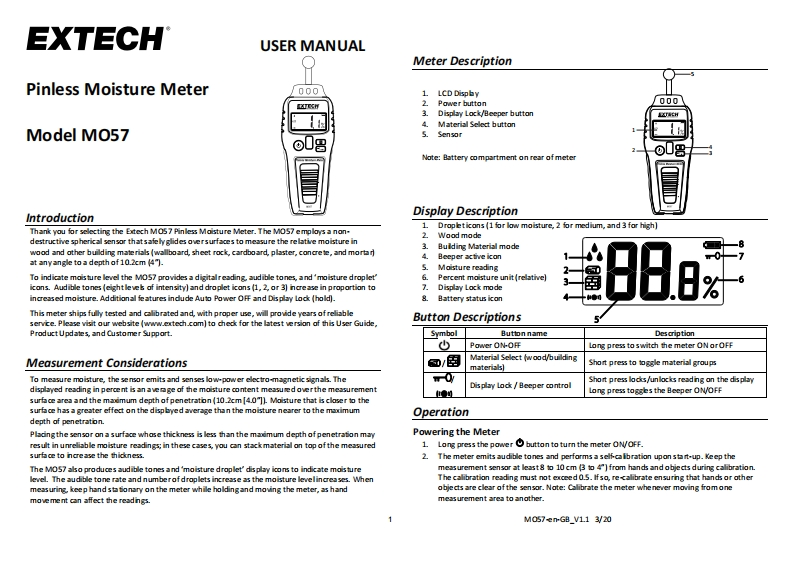
EXTECHUSER MANUALMeter DescriptionPinless Moisture Meter0001 LCD Dispby2Power button0003.Display Lock/Beeper button送H4.Material Select buttonModel MO575.Sensor0808Note:Battery compartment on rear of meterIntroductionDisplay Description1.Thank you for selecting the Extech Ma57 Pinless Moisture Meter.The MO57 employs a non-Dropeticons (1 for low moisture,2 for medium,and 3 for high)2destructive spherical sensor thatsafely glides oversurfaces to measure the relative moisture inWood mode3.Building Material modewood and other building materials (wallboard,sheet rock,cardboard,plaster,concrete,and mortar4Beeper active iconat anyangle to a depth of 10.2cm (4").5.Moisture readingTo indicate moisture level the MOS7 provides a digitalreading,audible tones,and'moisture droplet'Percent moisture unit(relative)icons.Audible tones (eight leveb of intensity)and droplet icons(1,2,or 3)ncrease in proportion to7.Display Lock modeincreased moisture.Additional fe atures indude Auto Power OFF and Dis play Lock (hold).Battery status iconThis meter ships fully tested and callibrated and,with proper use,will provide years of reliableservice.Please visit our website(www.extech.com)to check for the latest version of this User Guide,Button DescriptionsProduct Updates,and Customer Support.SymbolButton nameDescriptionPower ON-O开Long press to switch the meter ON orOFFMeasurement Considerations@/图Material Select (wood/buildingmaterials)Short press to如gle material group吗To measure moisture,the sensor emits and senses lowpower electro-magnetic signals.TheShort press lockes/unlocks reading on the displaydisplayed reading in percent is an avenge of the moisture content measued overthe measurementDisplay Lock Beeper control山●Long press togges the Beeper ONOFFsurface area and the maimum depth ofpenetration(10.2cm[4.0"])Moisture that is closer to thesurfa ce has a greater effect on the dispbyed average than the moisture nearer to the maoimumOperationdepth of penetraton.Placing the sensor on a surface whose thickness is less than the maimum depth of penetration mayPowering the Meterresult in unreliable moisture readings;in these cases,you can stack material on top of the measured1Long press the power button to turn the meter ON/OFF.surface to incre ase the thidkness.2.The meter emits sudible tones and performs a selfcalbration upon start-up.Keep theThe MO57 also produces audible tones and 'moisture droplet'display icons to indicate moisturemeasurement sensor at least8 to 10 cm B to 4"]from hands and objects during calibration.level.The audible tone rate and numberofdroplets increase as the moisture levelincreases.WhenThe calibration reading must not exceed 0.5.Ifso,re-calibrate ensuring that hands or othermeasuring,keep hand sta tonary on the meter while holdingand moving the meter,as handobjects are clear of the sensor.Note:Calibrate the meter whenever moving fromonemovement can affect the readngs.measurement area to another.M07emGB_V113/20


请登录后查看评论内容