
第1页 / 共4页
试读已结束,还剩3页,您可下载完整版后进行离线阅读
THE END
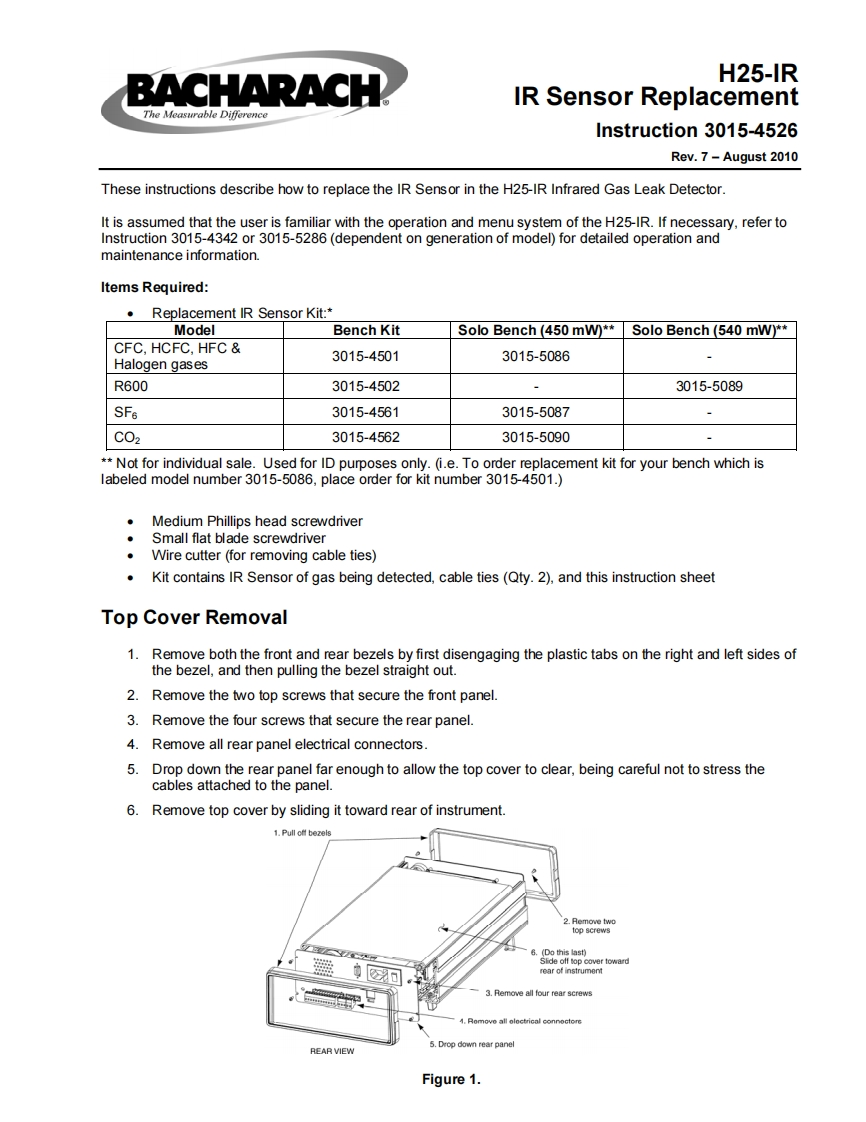
BACHARACHH25-IRIR Sensor ReplacementThe Measurable DifferenceInstruction 3015-4526Rev.7-August 2010These instructions describe how to replace the IR Sensor in the H25-IR Infrared Gas Leak Detector.It is assumed that the user is familiar with the operation and menu system of the H25-IR.If necessary,refer toInstruction 3015-4342 or 3015-5286(dependent on generation of model)for detailed operation andmaintenance information.Items Required:●Replacement IR Sensor Kit:*ModelBench KitSolo Bench (450 mW)**Solo Bench (540 mW)**CFC,HCFC,HFC3015-45013015-5086、Halogen gasesR6003015-45023015-5089SFe3015-45613015-5087C023015-45623015-5090*Not for individual sale.Used for ID purposes only.(i.e.To order replacement kit for your bench which islabeled model number 3015-5086,place order for kit number 3015-4501.)Medium Phillips head screwdriverSmall flat blade screwdriverWire cutter(for removing cable ties)Kit contains IR Sensor of gas being detected,cable ties (Qty.2),and this instruction sheetTop Cover Removal1.Remove both the front and rear bezels by first disengaging the plastic tabs on the right and left sides ofthe bezel,and then pulling the bezel straight out.2.Remove the two top screws that secure the front panel.3.Remove the four screws that secure the rear panel.4.Remove all rear panel electrical connectors.5.Drop down the rear panel far enough to allow the top cover to clear,being careful not to stress thecables attached to the panel.6.Remove top cover by sliding it toward rear of instrument.1.Pull off bezels2.Remove twotoo screws226.可。3rear of instrument3.Remove all four rear screwsREAR VIEW5.Drop down rear panelFigure 1.


请登录后查看评论内容