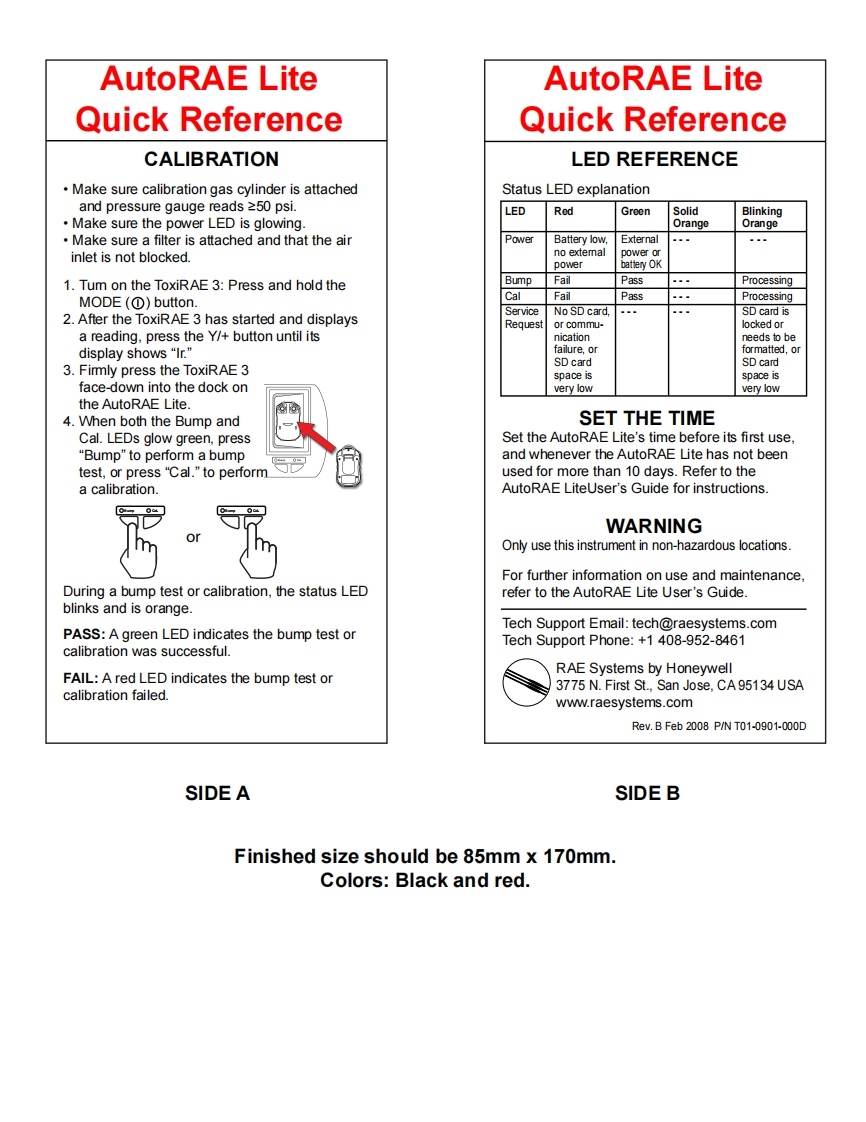
AutoRAE LiteAutoRAE LiteQuick ReferenceQuick ReferenceCALIBRATIONLED REFERENCEMake sure calibration gas cylinder is attachedStatus LED explanationand pressure gauge reads 250 psi.LEDRedGreenSolidBlinkingMake sure the power LED is glowing.OrangeOrangeMake sure a filter is attached and that the airPowerBattery low.Externalinlet is not blocked.no extemalpower orpowerbattery OK1.Tum on the ToxiRAE 3:Press and hold theBump FailPass””ProcessingMODE(①)button.CalFailPassProcessing2.After the ToxiRAE 3 has started and displaysService No SD card.SD card isRequestor commu-locked ora reading,press the Y/+button until itsnicationneeds to bedisplay shows“lr"failure,orformatted,or3.Fimmly press the ToxiRAE 3SD cardSD cardspace isspace isface-down into the dock onvery lowvery lowthe AutoRAE Lite.4.When both the Bump andSET THE TIMECal.LEDs glow green,pressSet the AutoRAE Lite's time before its first use,"Bump"to perform a bumpand whenever the AutoRAE Lite has not beentest,or press "Cal."to performused for more than 10 days.Refer to thea calibration.AutoRAE LiteUser's Guide for instructions.WARNINGOnly use this instrument in non-hazardous locations.For further information on use and maintenance,During a bump test or calibration,the status LEDrefer to the AutoRAE Lite User's Guide.blinks and is orange.Tech Support Email:tech@raesystems.comPASS:A green LED indicates the bump test orTech Support Phone:+1 408-952-8461calibration was successful.FAIL:A red LED indicates the bump test orRAE Systems by Honeywell3775 N.First St.,San Jose,CA95134 USAcalibration failed.www.raesystems.comRev.B Feb 2008 P/N T01-0901-000DSIDE ASIDE BFinished size should be 85mm x 170mm.Colors:Black and red.



请登录后查看评论内容