
第1页 / 共20页
第2页 / 共20页
试读已结束,还剩18页,您可下载完整版后进行离线阅读
THE END
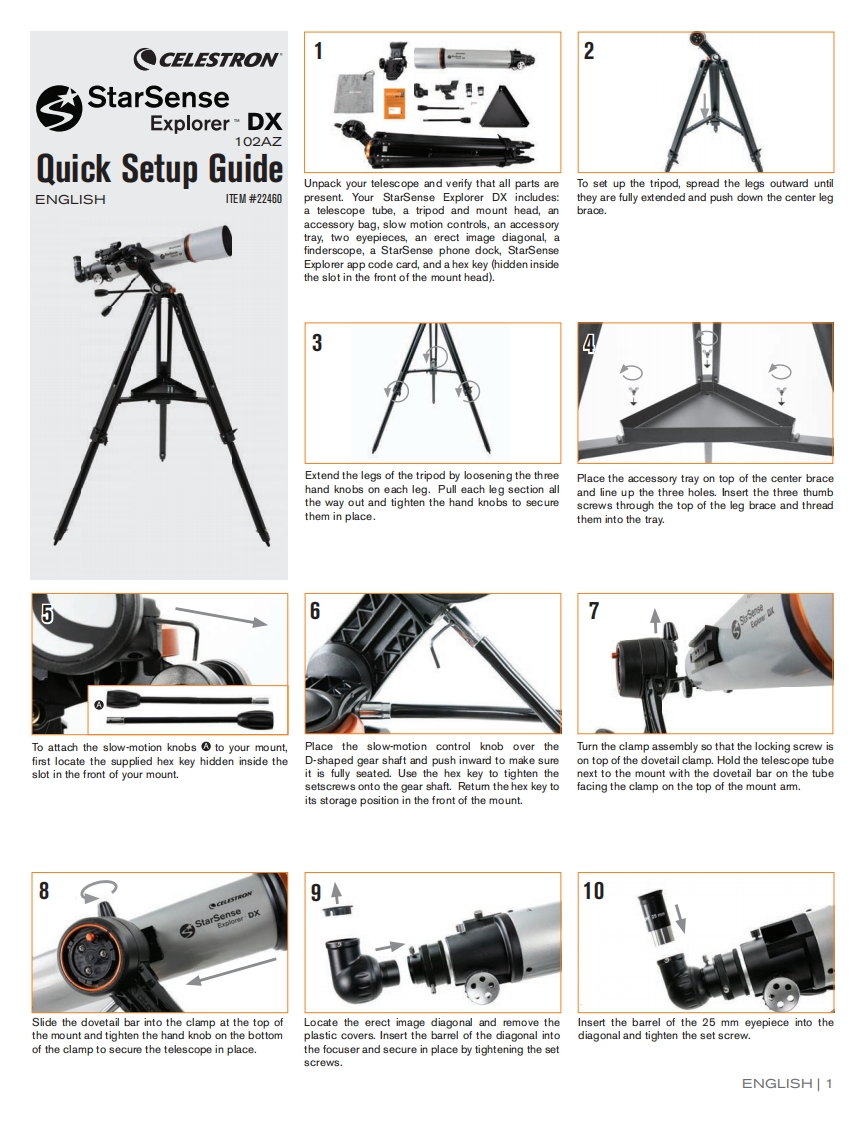
CELESTRON2StarSenseExplorer-DX102AZQuick SetupGuideUnpack your telescope and verify that all parts areTo set up the tripod,spread the legs outward untilENGLISH1TEM#22460present.Your StarSense Explorer DX includes:they are fully extended and push down the center lega telescope tube,a tripod and mount head,anbrace.accessory bag,slow motion controls,an accessorytray,two eyepieces,an erect image diagonal,afinderscope,a StarSense phone dock,StarSenseExplorer app code card,and a hex key (hidden insidethe slot in the front of the mount head).34Extend the legs of the tripod by loosening the threePlace the accessory tray on top of the center bracehand knobs on each leg.Pull each leg section alland line up the three holes.Insert the three thumbthe way out and tighten the hand knobs to securescrews through the top of the leg brace and threadthem in place.them into the tray.69To attach the slow-motion knobs to your mount,Place the slow-motion control knob over theTurn the clamp assembly so that the locking screw isfirst locate the supplied hex key hidden inside theD-shaped gear shaft and push inward to make sureon top of the dovetail clamp.Hold the telescope tubeslot in the front of your mount.it is fully seated.Use the hex key to tighten thenext to the mount with the dovetail bar on the tubesetscrews onto the gear shaft.Retum the hex key tofacing the clamp on the top of the mount arm.its storage position in the front of the mount.8910Slide the dovetail bar into the clamp at the top ofLocate the erect image diagonal and remove theInsert the barrel of the 25 mm eyepiece into thethe mount and tighten the hand knob on the bottomplastic covers.Insert the barrel of the diagonal intodiagonal and tighten the set screw.of the clamp to secure the telescope in place.the focuser and secure in place by tightening the setscrews.ENGLISH1



请登录后查看评论内容